











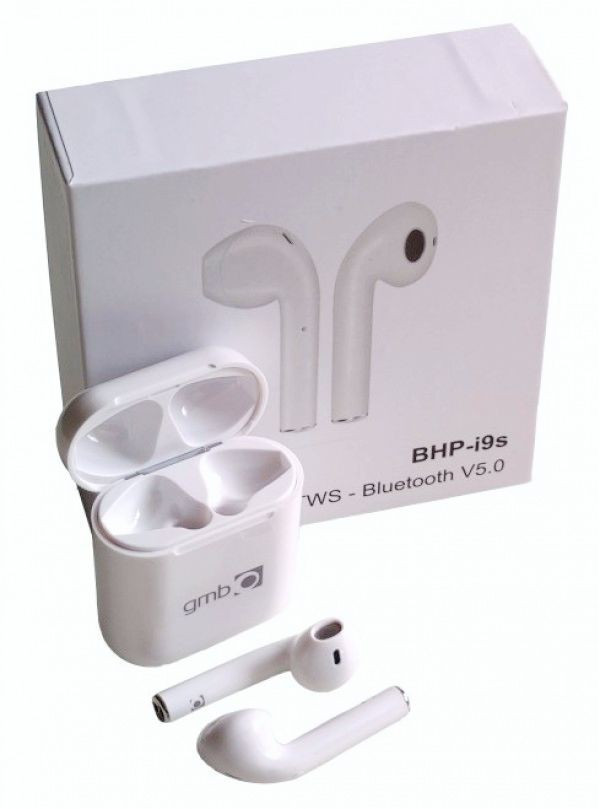
x-BHP-i9S*Gembird bluetooth V5.0 slusalice TWS, auto pairing, 16ohm, button cont, dual earphone(899)
- Proizvod iz grupe: Slušalice i mikrofoni
- Proizvođač: GEMBIRD
- Nema na stanju
Šifra: 8541
Očekivani rok isporuke je 1-7 radnih dana
Artikal nije dostupan
Za sve porudžbine čija je vrednost do 20.000 dinara, isporuka kurirskom službom se naplaćuje po zvaničnom cenovniku kurirske službe možete pogledati na sledećem linku. Vidi cenovnik. Besplatna isporuka na kućnu adresu važi za narudžbine u vrednosti preko 20.000 dinara i do 5kg težine, a ne spadaju u kategoriju SPECIJALNA ISPORUKA.
Product specification
• Model: i9S TWS
* airpod - earbud
•Version: 5.0
• Input: DC 5V
• Battery capacity: 3.7 V/50mAh
• Talking time: 1-2hours
• Charging time: 40-50 mm
• Profile support: HSP/HFP/A2DP/AVRCP
• Sensitive:120±5dB
• Frequency response: 20-20000Hz
• lmpedance: 32 Ohm
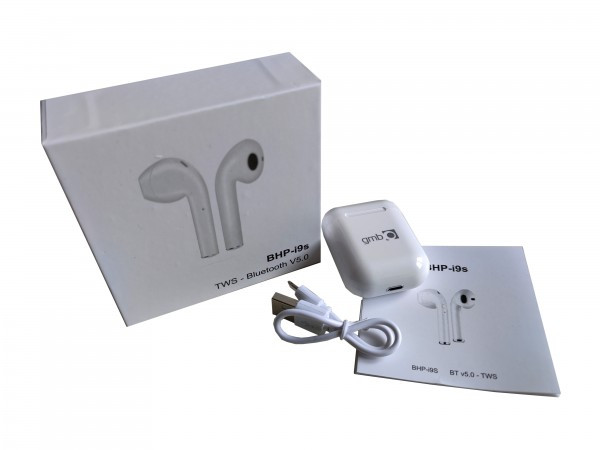
Package list
• Wireless earphones
• Charging case
• Charging cable for case
• Instruction
• Packaging box
Products use
1. Wireless pairing
A Long press the multi-function buttons of both sides at the
same time until the LED flashing in red and blue alternately or
blue, and release your hands, the both sides could pair
automatically.
Remark: The earphones could be self-paired once open, but if
it’s not paired, pis refer to the below steps to pair the
earpieces.
B Long press the muiti-function buttons of both sides at the
same time until the LED fashing in red and blue alternately.
Then double click either side to enter pairing mode. When
they are paired successful, the main earphone continue to
flashing in red and blue alternately and the another earphone
flashing in blue once every 5 seconds.
C. Turn on the bluetooth on your device and choose i9s-tws
to connect. when the LED of both sides fash slowly in blue,
the earphones connect with your device successful.
D. The earphones will be automatically paired after th first
pairing is successful. Earphones and cell phones are
automatically linked if earphones working for the same used
cell phones Or manually select the i9s-tws to connect again if
the earphones working for another phones
2. Change instruction:
A Earphones charging indicator: The red light on when
the earphones is charging, and the red light off Automatically
after the earphones full of power. 8.Charging case charging
indicator: The blue lights on when it’s for earphones
charging, and red light’s on when it’s charging The lights
will be off when they are full charged.
3. OFF
Long press the function key for several seconds, and RED
light s on firstly, then power off. When the earphones is
paired, turns one of the earphones off, the either side will be
off automatically.
4.CALL
When the earphones on and connected with phone, making
answering phone call is supported, and only one side works
during phone call
Caller number alert,press the function key on working
earphone can response calling, and long press for ejected
Press function key to hang up the calling In call volume could
be adjusted by mobile.
5. Listen to the music
Listening to the music is supported after mobile phone
connected with earphones
Press function key to stop the music, re-click to start the
music
Double click the function key to call back
Precautions
1. The earphones should be stored in a dry and ventilated
environment.to avoid oil water moisture and dust affecting
product performance.
2. Avoid using stimulus, organic solvents or items containing
these ingredients to clean the earphones.
3. The use of earphones should be correctly as per the
specification, pay attention to use the influence of
environment on the earphones. in order to ensure the
smooth connection, it’s recommended that the distance
between the earphones and phones within 10 meters.
4. If the earphones failed to connect or with poor
connection, pis do not take apart the earphones or the
accessories on your own Otherwise no warrant
5. Regarding charging earphones. Pis use the standard usb
cable or pointed charging cable from our company to charge
the earphones.
6. In order to ensure normal use, please ensure sufficient
power of the earphones
*This is not an original iPhone bluetooth headset. This is a 3rd party product.
“iPhone”, “Earpods”, “AirPods ”, “Apple earpods”, are trademarks of the same company
All brands and logos are registered trademarks of their respective owners.
Product specification
• Model: i9S TWS
* airpod - earbud
•Version: 5.0
• Input: DC 5V
• Battery capacity: 3.7 V/50mAh
• Talking time: 1-2hours
• Charging time: 40-50 mm
• Profile support: HSP/HFP/A2DP/AVRCP
• Sensitive:120±5dB
• Frequency response: 20-20000Hz
• lmpedance: 32 Ohm
Package list
• Wireless earphones
• Charging case
• Charging cable for case
• Instruction
• Packaging box
Products use
1. Wireless pairing
A Long press the multi-function buttons of both sides at the
same time until the LED flashing in red and blue alternately or
blue, and release your hands, the both sides could pair
automatically.
Remark: The earphones could be self-paired once open, but if
it’s not paired, pis refer to the below steps to pair the
earpieces.
B Long press the muiti-function buttons of both sides at the
same time until the LED fashing in red and blue alternately.
Then double click either side to enter pairing mode. When
they are paired successful, the main earphone continue to
flashing in red and blue alternately and the another earphone
flashing in blue once every 5 seconds.
C. Turn on the bluetooth on your device and choose i9s-tws
to connect. when the LED of both sides fash slowly in blue,
the earphones connect with your device successful.
D. The earphones will be automatically paired after th first
pairing is successful. Earphones and cell phones are
automatically linked if earphones working for the same used
cell phones Or manually select the i9s-tws to connect again if
the earphones working for another phones
2. Change instruction:
A Earphones charging indicator: The red light on when
the earphones is charging, and the red light off Automatically
after the earphones full of power. 8.Charging case charging
indicator: The blue lights on when it’s for earphones
charging, and red light’s on when it’s charging The lights
will be off when they are full charged.
3. OFF
Long press the function key for several seconds, and RED
light s on firstly, then power off. When the earphones is
paired, turns one of the earphones off, the either side will be
off automatically.
4.CALL
When the earphones on and connected with phone, making
answering phone call is supported, and only one side works
during phone call
Caller number alert,press the function key on working
earphone can response calling, and long press for ejected
Press function key to hang up the calling In call volume could
be adjusted by mobile.
5. Listen to the music
Listening to the music is supported after mobile phone
connected with earphones
Press function key to stop the music, re-click to start the
music
Double click the function key to call back
Precautions
1. The earphones should be stored in a dry and ventilated
environment.to avoid oil water moisture and dust affecting
product performance.
2. Avoid using stimulus, organic solvents or items containing
these ingredients to clean the earphones.
3. The use of earphones should be correctly as per the
specification, pay attention to use the influence of
environment on the earphones. in order to ensure the
smooth connection, it’s recommended that the distance
between the earphones and phones within 10 meters.
4. If the earphones failed to connect or with poor
connection, pis do not take apart the earphones or the
accessories on your own Otherwise no warrant
5. Regarding charging earphones. Pis use the standard usb
cable or pointed charging cable from our company to charge
the earphones.
6. In order to ensure normal use, please ensure sufficient
power of the earphones
*This is not an original iPhone bluetooth headset. This is a 3rd party product.
“iPhone”, “Earpods”, “AirPods ”, “Apple earpods”, are trademarks of the same company
All brands and logos are registered trademarks of their respective owners.
• Model: i9S TWS
* airpod - earbud
•Version: 5.0
• Input: DC 5V
• Battery capacity: 3.7 V/50mAh
• Talking time: 1-2hours
• Charging time: 40-50 mm
• Profile support: HSP/HFP/A2DP/AVRCP
• Sensitive:120±5dB
• Frequency response: 20-20000Hz
• lmpedance: 32 Ohm
Package list
• Wireless earphones
• Charging case
• Charging cable for case
• Instruction
• Packaging box
Products use
1. Wireless pairing
A Long press the multi-function buttons of both sides at the
same time until the LED flashing in red and blue alternately or
blue, and release your hands, the both sides could pair
automatically.
Remark: The earphones could be self-paired once open, but if
it’s not paired, pis refer to the below steps to pair the
earpieces.
B Long press the muiti-function buttons of both sides at the
same time until the LED fashing in red and blue alternately.
Then double click either side to enter pairing mode. When
they are paired successful, the main earphone continue to
flashing in red and blue alternately and the another earphone
flashing in blue once every 5 seconds.
C. Turn on the bluetooth on your device and choose i9s-tws
to connect. when the LED of both sides fash slowly in blue,
the earphones connect with your device successful.
D. The earphones will be automatically paired after th first
pairing is successful. Earphones and cell phones are
automatically linked if earphones working for the same used
cell phones Or manually select the i9s-tws to connect again if
the earphones working for another phones
2. Change instruction:
A Earphones charging indicator: The red light on when
the earphones is charging, and the red light off Automatically
after the earphones full of power. 8.Charging case charging
indicator: The blue lights on when it’s for earphones
charging, and red light’s on when it’s charging The lights
will be off when they are full charged.
3. OFF
Long press the function key for several seconds, and RED
light s on firstly, then power off. When the earphones is
paired, turns one of the earphones off, the either side will be
off automatically.
4.CALL
When the earphones on and connected with phone, making
answering phone call is supported, and only one side works
during phone call
Caller number alert,press the function key on working
earphone can response calling, and long press for ejected
Press function key to hang up the calling In call volume could
be adjusted by mobile.
5. Listen to the music
Listening to the music is supported after mobile phone
connected with earphones
Press function key to stop the music, re-click to start the
music
Double click the function key to call back
Precautions
1. The earphones should be stored in a dry and ventilated
environment.to avoid oil water moisture and dust affecting
product performance.
2. Avoid using stimulus, organic solvents or items containing
these ingredients to clean the earphones.
3. The use of earphones should be correctly as per the
specification, pay attention to use the influence of
environment on the earphones. in order to ensure the
smooth connection, it’s recommended that the distance
between the earphones and phones within 10 meters.
4. If the earphones failed to connect or with poor
connection, pis do not take apart the earphones or the
accessories on your own Otherwise no warrant
5. Regarding charging earphones. Pis use the standard usb
cable or pointed charging cable from our company to charge
the earphones.
6. In order to ensure normal use, please ensure sufficient
power of the earphones
*This is not an original iPhone bluetooth headset. This is a 3rd party product.
“iPhone”, “Earpods”, “AirPods ”, “Apple earpods”, are trademarks of the same company
All brands and logos are registered trademarks of their respective owners.
- Naziv artikla:
- x-BHP-i9S*Gembird bluetooth V5.0 slusalice TWS, auto pairing, 16ohm, button cont, dual earphone(899)
- Naziv i vrsta robe:
- Slušalice i mikrofoni
- Uvoznik:
- Dostupno na ambalaži proizvoda
- Zemlja porekla:
- Dostupno na ambalaži proizvoda
- Prava potrošača:
- Zagarantovana sva prava kupaca po osnovu zakona o zaštiti potrošača
Srodni proizvodi